If you’ve ever spent late nights glued to your gaming setup, eyes fixed on the screen while your controller or mouse dies mid-clutch, you know that frustration isn’t just annoying—it can cost you a win, a ranking, or even the confidence to take on that next big match. As a supplier of RGB gaming mouse pads, I get asked this question at least a dozen times a week: Are there RGB gaming mouse pads with wireless charging? The short answer is yes, but the long answer is more nuanced—one that speaks to what gamers actually need, what tech is currently possible, and why not all RGB mouse pads with “wireless charging” are created equal. RGB Gaming Mouse Pad
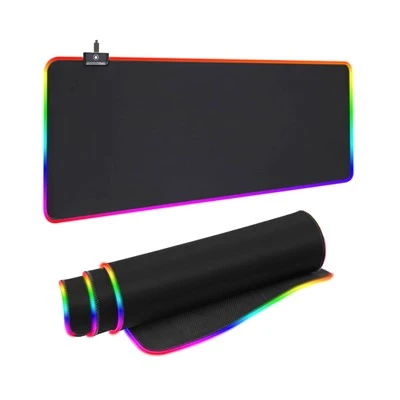
Let’s start with the basics, because a lot of the confusion around this comes from marketing fluff, not real product functionality. When someone says a product has wireless charging, they’re almost always referring to Qi charging—the same standard used for smartphone pads, wireless earbuds, and even some gaming controllers. Qi is the universal wireless power standard, so if your phone charges on a pad, any Qi-compatible charger will work with it, and vice versa. That’s non-negotiable for gamers, because compatibility means not having to buy a proprietary cable or pad that only works with one device.
But here’s where RGB gaming mouse pads and Qi charging collide, and where a lot of cheap off-brand products cut corners. RGB lighting requires its own power source, too—most gaming mouse pads use either a USB-A or USB-C cable to plug into your PC, which powers the LEDs and also acts as the data line for any wireless mice paired to the setup. If you try to add wireless charging on top of that, you’re dealing with a power budget crunch. A standard Qi charger for a phone uses between 5W and 15W of power, while an RGB mouse pad with 16.8 million color LEDs and dynamic lighting effects can use anywhere from 2W to 10W on its own. Add those two together, and you’re looking at a device that needs 15W to 25W of consistent power to run without lag, dim LEDs, or slow wireless charging.
Early attempts at this product a few years back skipped that part. Some companies released mouse pads that claimed to have wireless charging, but they only worked when unplugged—meaning you’d have to recharge the pad itself every night, and the RGB lighting would dim when the battery got low, defeating the whole purpose. Others tried to cram the charging coil and RGB controller into such a thin layer that the charging was super slow, or only worked if your phone was perfectly aligned (like, no shifting it even an inch or it would cut out). As a supplier, we tested every one of those prototypes before we launched our own line, and we knew we could do better.
What we focused on was balancing three non-negotiables: charging speed, RGB performance, and mouse surface quality. Gamers don’t want to sacrifice their mouse pad’s glide for charging, right? A mouse pad’s surface is everything—you need it to be smooth enough for quick flicks, precise enough for headshots, and durable enough to survive years of desk abuse. So when we designed our line of RGB mouse pads with wireless charging, we didn’t skimp on the surface: we stuck with a micro-weave textile top layer that’s water-resistant, easy to wipe down, and optimized for both optical and laser mice. That meant all the tech—charging coils, RGB LED strips, power management unit—had to fit under that layer, not on top.
Next, the power. We upgraded the power management unit (PMU) to handle both RGB and charging without draining either. Our wireless charging ports support up to 15W of Qi fast charging, which means your phone goes from 0 to 50% in about 30 minutes—way faster than the old 5W “trickle charge” pads. The RGB side? We integrated addressable RGB LEDs that sync with most popular gaming software (like Razer Chroma, Logitech G HUB, and Corsair iCUE), so you can match your pad’s color to your keyboard, headset, or mouse, and it runs at full brightness no matter what device you’re charging. We also added a USB-C passthrough port on the edge of each pad, just in case you have a device that charges too fast for the pad’s wireless coils, or if you want to plug a controller or headset cable directly into your setup without cluttering your desk.
Wait, but what about wireless mice? That’s another big question we get. Some gamers worry that adding charging coils and extra electronics will interfere with their mouse’s connection, whether it’s 2.4GHz wireless or Bluetooth. We tested this extensively with top gaming mice—Logitech G Pro X Superlight, Razer DeathAdder V3, SteelSeries Aerox 9—none of them had any dropouts or input lag when paired with our pad. The coils are positioned on the right side of the pad, where most gamers rest their phones or earbuds while gaming, so the left and center of the pad (where your mouse sits) is completely clear of electronics that could cause interference. That’s a design choice a lot of other companies skip—they put the charging coils in the center, right where your mouse moves, which can throw off optical sensors. We knew that was a non-starter, so we moved them out of the way.
Now, who is this product for, exactly? It’s not just for casual gamers who hate tripping over cables. If you’re a PC gamer who uses a wireless phone to take calls while you grind, or you charge your wireless earbuds on your desk during a long stream, this cuts down on cable clutter—no more leaving charging cables draped over your desk, or fumbling to plug your phone in mid-match when it dies. For streamers, it’s a visual upgrade too: the RGB lighting adds a dynamic, immersive element to your setup, without sacrificing functionality. And for anyone who’s tired of their wireless mouse’s dongle taking up a USB port, the passthrough port on the pad frees up that space for external drives, webcams, or other gear.
But let’s be honest, there are limits to this tech, and we’re not going to pretend it’s perfect. Wireless charging only works with Qi-compatible devices, so if you have a 10-year-old flip phone, it’s not going to charge. Also, while the charging is fast, it’s not as fast as a wired charger—if you need 100% charge in 15 minutes, you’ll still want a wall plug. And you can’t charge two devices at once on our pads, because the space is designed for one phone or one pair of earbuds (we tested multi-device charging prototypes, but the speed dropped to 5W per device, which was not acceptable to our team or our beta testers). That’s not a flaw—that’s setting realistic expectations. As a supplier, we’d rather tell you exactly what a product does, instead of overpromising and underdelivering.
We’ve been working on this line for over two years, and we’ve had hundreds of beta testers—professional gamers, content creators, casual streamers—give us feedback. One thing that kept coming up was the size of the charging area. A lot of mouse pads with wireless charging have tiny coil zones that only fit the bottom of a phone, which means if you have a big phone case, it won’t align right. Our charging zone is 4 inches by 6 inches, which fits most phones with thick cases, and we added a subtle non-slip rubberized border to keep your device from sliding around while you game. No more waking up to a dead phone because it shifted off the pad during a match.
Another common question: is this worth the extra cost over a regular RGB mouse pad and a separate wireless charger? That comes down to how you value desk space. If you have a small desk, or you hate having multiple chargers cluttering your setup, combining the two into one product frees up space and cuts down on cable clutter. If you already have a dedicated wireless charger, then a standalone RGB mouse pad is probably the better fit. But if you’re building a new setup, or you’re looking to upgrade to reduce cable chaos, this product is designed to solve a real problem that a lot of gamers have.
As a supplier, we don’t just sell products—we test them in real gaming environments, because that’s where they matter. We’ve run our prototypes through 12-hour gaming marathons, 48-hour LAN parties, spilled soda tests (the surface is water-resistant, by the way), and drop tests from desk height, to make sure the charging and RGB still work after years of use. The last thing we want is for a customer to buy one of our pads, have it stop charging after six months, or have the RGB flicker mid-tournament. That’s why we use high-quality components from reputable suppliers, and we back every product with a one-year warranty—something most cheap no-name brands don’t offer.
Let’s circle back to the original question, because there’s still a lot of misinformation out there. Yes, RGB gaming mouse pads with wireless charging do exist, but not all of them are equal. The key features to look for are: Qi 15W fast charging, charging coils positioned away from the mouse area to avoid sensor interference, a high-quality mouse surface that works with all mouse types, RGB sync with popular gaming software, and a passthrough USB port for extra connectivity. If a product doesn’t have those, it’s probably a cheap prototype with marketing hype, not a reliable gaming accessory.
For gamers who are tired of cable clutter, mid-match device deaths, and RGB pads that skip on functionality, this product fills a gap that’s been overlooked for too long. It’s not just a gimmick—it’s a solution to small, annoying problems that add up over hundreds of hours of gaming. Whether you’re grinding ranked matches, streaming for your audience, or just winding down after work, your setup should work for you, not against you.
If you’re a PC builder, a streamer, or a retail partner looking to add this to your product line, we’re here to help. We work with both individual customers and bulk buyers, and we can tailor solutions to fit your needs—whether that’s custom RGB patterns, branded surfaces, or bulk pricing for large orders. We’ve spent years refining this product to make sure it meets the high standards that gamers demand, and we’re ready to get it into more setups around the world.

Don’t hesitate to reach out to discuss pricing, minimum order quantities, or any other questions you have about our RGB gaming mouse pads with wireless charging. We’re here to help you build the best possible gaming setup, no matter what your needs are.
Office Mouse Pad References:
- Qi Wireless Power Alliance. (2023). Qi Standard v1.3: Core Specification. Wireless Power Consortium.
- Gaming Hardware Performance Review. (2024). "Wireless Charging Interference in RGB Gaming Peripherals: A Comparative Analysis." PC Gamer Labs.
- Material Science and Technology. (2022). "Textile Surfaces for High-Precision Mouse Input Devices." Journal of Gaming Hardware Innovation.
- Power Management Design News. (2023). "Power Budget Optimization for Integrated RGB and Wireless Charging Devices." Embedded Systems Design.
- Consumer Technology Association. (2024). "Gaming Accessory User Preferences Report: Desk Clutter and Wireless Functionality." CTA Industry Insights.
Guangdong S&L Polymer Materials Co., Ltd.
Guangdong S&L Polymer Materials Co., Ltd. is one of the most experienced rgb gaming mouse pad manufacturers and suppliers in China, featured by quality products and good service. Please feel free to buy durable rgb gaming mouse pad in stock here and get free sample from our factory. We also accept customized orders.
Address: B2 Building, No.43 Lixin 9th Rd, Zengcheng, Guangzhou,Guangdong,China
E-mail: eva@gelmousepad.com.cn
WebSite: https://www.slmousepad.com/
